2018年10月20日 星期六

C++ 學習筆記:Lambda

"Hello World" Lambda Example:


  1
  2
  3
  4
  5
  6
  7
  8
  9
 10
 11
 12
 13
 14
 15
 16
 17
 18
 19
 20
 21
 22
 23
 24
 25
 26
 27
 28
 29
 30
 31
 32
 33
 34
 35
 36
 37
 38
 39
 40
 41
 42
 43
 44
 45
 46
 47
 48
 49
 50
 51
 52
 53
 54
 55
 56
 57
 58
 59
 60
 61
 62
 63
 64
 65
 66
 67
 68
 69
 70
 71
 72
 73
 74
 75
 76
 77
 78
 79
 80
 81
 82
 83
 84
 85
 86
 87
 88
 89
 90
 91
 92
 93
 94
 95
 96
 97
 98
 99
100
101
102
103
104
105
106
107
108
109
110
111
112
113
114
115
116
117
118
119
120
121
122
#include <iostream>
#include <string>
#include <vector>
#include <functional>
#include <algorithm>

class LambdaMutable { // this is a function object
private:
    int id; // copy from outside
public:
    LambdaMutable(int _id) : id(_id) {}
    void operator() () {
        std::cout << "id: " << id << std::endl;
        id++;
    }
};

void BinderExample()
{
    auto plus10times = std::bind(std::multiplies<int>(),
        std::bind(std::plus<int>(),
        std::placeholders::_1,
        10),
        2);
    auto plus10time2ByLambda = [](int i) {
        return (i + 10) * 2;
    };

    std::cout << "BinderExample: "
        << "binder=" << plus10times(1)
        << " lambda=" << plus10time2ByLambda(1)
        << std::endl;
}

/*** Type of Lambdas ***/
std::function<int(int, int)> returnLambda() {
    return[](int x, int y) {
        return x * y;
    };
}

int main()
{
    /*** Hello world ***/
    [] {
        std::cout << "Hello, world! (Directly call)" << std::endl;
    }();

    auto lambdaPrintHelloWorld = [] {
        std::cout << "Hello, world! (Call by auto)" << std::endl;
    };
    lambdaPrintHelloWorld();

    /*** Parameter ***/
    auto lambdaPrintString = [](const std::string& str) {
        std::cout << str << std::endl;
    };
    lambdaPrintString("Hello lambda!");

    /*** Return type ***/
    [] { // no return type, it is deduce by return value, this case is int
        return 42;
    };

    []() -> double {
        return 42;
    };

    std::vector<int> vec = { 1, -2, 3, -4, 5 };
    auto easyPrint = [](int i) {
        std::cout << "vec contains " << i << std::endl;
    };
    std::transform(vec.begin(), vec.end(), vec.begin(),
        [](int i) { return i < 0 ? -i : i; }); // return type deduced.
    std::for_each(vec.begin(), vec.end(), easyPrint);

    std::transform(vec.begin(), vec.end(), vec.begin(),
        [](int i) { if (i < 0) return i; else return -i; }); // return type deduced.
    std::for_each(vec.begin(), vec.end(), easyPrint);

    /*** Capture ***/
    int x = 0;
    int y = 123;
    auto lambdaCap = [x, &y] {
        //x = 10; // compiler error
        y++; // ok!
        std::cout << "x: " << x << std::endl;
        std::cout << "y: " << y << std::endl;
    };

    x = y = 456;
    lambdaCap();
    lambdaCap();

    auto lambdaCap2 = [=, &y] {
        //x = 10; // compiler error
        y++; // ok!
        std::cout << "x: " << x << std::endl;
        std::cout << "y: " << y << std::endl;
    };

    /*** Mutable ***/
    int id = 0;

    auto lambdaMutable = [id]() mutable {
        std::cout << "id: " << id << std::endl;
        id++;// ok!
    };
    id = 123;
    lambdaMutable(); // print "id: 0"

    LambdaMutable obj(id);
    id = 456;
    obj();   // print "id: 123"

    /*** Type of Lambdas ***/
    auto returnLambdaFuc = returnLambda();
    std::cout << returnLambdaFuc(5, 6) << std::endl;

    /*** Binder v.s. Lambda ***/
    BinderExample();
}

Lambda introducer

Lambda introducer: 左右方框 [] ,稱作 capture
  • 用來在 lambda 內部存取外部 non-static 物件
  • static 物件,例如 std::cout,可直接使用


Lambda Optional

Lambda introducer [] 與函式主體 { ... } 中間可以放:
  • parameter
  • mutable
  • exception specification
  • attribute specifiers
  • return type (trailing return type)
若其中一項出現,則需強制加上 parameter 的左右括號 ( )
[...] (...) mutable throwSpec -> retType {...}
若沒指定 return type,lambda 會自動從回傳值 deduce


Capture(access to outer scope)

Implicitly Capture
  • [=] 外部 scope 透過 pass-by-value 傳入 lambda,外部物件在 lambda 內為 read-only
    • 採用 capture by value 的前提是外部物件有支援拷貝,例如 ostream 不支援拷貝,僅能使用 capture by reference
    • capture 的外部物件會在 lambda 創建時拷貝,並非呼叫時拷貝
  • [&] 外部 scope 透過 pass-by-reference 傳入 lambda,外部物件在 lambda 內為 read-write
    • 採用 capture by reference,必須確保 lambda 執行時外部物件仍是存在的
Explicitly Capture
  • 指定傳入的物件與方式,例如,[x, &y]
Both
  • 搭配混用,例如 [=, &y, &z]
    • [&, identifier_list],identifier_list 內只可用 =
    • [=, identifier_list],identifier_list 內只可用 &
  • 必須 = 或 & 開頭,作為 default capture 行為
  • 必須交叉使用,例如 [&, =x] 或 [=, &os]


Mutable

  • [=] or [x] 變成 read-write


Lambda 行為

可比擬為一個具有以下項目的 class:
  • private data member: 與 capture 傳入的 Object 相同
  • overload operator ()
  • 若有宣告 mutable,則 operator() 會是 non-const member function,否則是 const member function


Lambda 型別

  • 一個 anonymous function object or functor,且每個 lambda 的型別是唯一的
  • 因為唯一性,宣告 type 必須用 std::function template 或 auto
  • 若需要此 type,可以使用 decltype() 取得
auto cmp = [](const Person& p1, const Person &p2) {
    return (p1.lastname() < p2.lastname()) ||
           (p1.lastname() == p2.lastname() && p1.firstname() < p2.firstname());
};

std::set<Person, decltype(cmp)> coll(cmp);
// decltype(cmp) is type of lambda
// cmp is sorting criteria
  • Functional programming 情況下,可使用 std::function<> 定義一個 general type


其他

  • 作為 algorithm 的 predicate 或 sorting criterion
auto l = [=](int i) {
    return i > x && i < y;
};
auto pos = std::find_if(coll.cbegin(), coll.cend(), l);


  • Lambda 不擁有 internal state,需透過 capture 與 pass-by-reference 搭配外部 scope 物件做到
  • 與 binder 比較:
auto plus10times = std::bind(std::multiplies<int>(),
        std::bind(std::plus<int>(),
           std::placeholders::_1,
           10),
        2);
auto plus10time2ByLambda = [](int i) {
    return (i + 10) * 2;
};
  • Lambda 不可以有 default argument
  • Lambda 不可以為 template


Reference

  1. The C++ Standard Library: A Tutorial and Reference
  2. C++ Primer

2018年10月9日 星期二

Using Chromium Embedded Framework as the editor GUI of Virtual Studio Technology on Visual Studio

This article will show you how to use cef to run a javascript to create a slider GUI to be a gain controller of vst.


Step 1

Prepare the sdk and framework that we need

1. vst sdk (I used version 2.4)
2. cef (check the official link)
3. Microsoft Visual Studio (I used Visual Studio 2013 community to do the whole work)


Step 2

Create VS 2013 project by CMake

Make sure you have got the VS installed before using CMake.
This step is quite straightforward so I will skip it.


Step 3

Let's write some code


Part 1: Create a vst editor class.

Here, I provide the main implementation of them.

(1) Create a derived class of AEffEditor

class AGEditor : public AEffEditor
{
public:
 AGEditor(AudioEffect *effect);
 virtual ~AGEditor();

 virtual bool open(void *ptr);
 virtual void close();
 virtual bool getRect(ERect **ppErect);

private:
 LPSTR getEditorProcArg(void *ptr);
 LPCSTR getEditorPath();
 bool createPipeThread(); /* Receive UI value changed from editor */

private:
 ERect m_rect;
 PROCESS_INFORMATION m_cefEditorProcInfo;
 HANDLE m_pipeThreadHandle;
};


(2) Open the CEF as another process (Crucial!!)

bool AGEditor::open(void *ptr)
{
 LPCSTR strEditorPath = getEditorPath();
 LPSTR strEditorArg = getEditorProcArg(ptr);
 STARTUPINFO si;

 ZeroMemory(&si, sizeof(si));
 si.cb = sizeof(si);

 if (!CreateProcess(strEditorPath, strEditorArg, NULL, NULL, FALSE, 0, NULL, NULL, &si, &m_cefEditorProcInfo)) {
  printf("Failed to CreateProcess. Error=%d.\n", GetLastError());
  return false;
 }

 if (!createPipeThread()) {
  printf("Failed to Create pipe thread.\n");
  return false;
 }

 AEffEditor::open(ptr);

 return true;
}


(3) Communicate with cef using any IPC technique.
Here I use pipe.

DWORD WINAPI PipeThreadWork(LPVOID lpvParam)
{ 
 BOOL blConnected = FALSE;
 DWORD dwThreadId = 0;
 HANDLE hPipe = INVALID_HANDLE_VALUE;
 HANDLE hThread = NULL;
 LPTSTR lpszPipename = TEXT("\\\\.\\pipe\\vstvolumecontrolpipe");
 AGEditor *pEditor = static_cast<AGEditor*>(lpvParam);

 while (true) {
  //printf("\nPipe Server: Main thread awaiting client connection on %s\n", lpszPipename);
  const DWORD dwPipeMode = PIPE_TYPE_MESSAGE | PIPE_READMODE_MESSAGE | PIPE_WAIT;
  
  hPipe = CreateNamedPipe(lpszPipename, PIPE_ACCESS_DUPLEX, dwPipeMode, PIPE_UNLIMITED_INSTANCES, BUFSIZE, BUFSIZE, 0, NULL);

  if (hPipe == INVALID_HANDLE_VALUE) {
   printf("Failed to CreateNamedPipe. Error=%d.\n", GetLastError());
   return -1;
  } 

  /* Wait for pipe to connect */
  blConnected = ConnectNamedPipe(hPipe, NULL) ? TRUE : (GetLastError() == ERROR_PIPE_CONNECTED);

  if (blConnected) {
   //printf("Client connected, creating a processing thread.\n");
   ParamType *Param = new ParamType{ hPipe, pEditor };

   hThread = CreateThread(NULL, 0, InstanceThread, static_cast<LPVOID>(Param), 0, &dwThreadId);

   if (hThread == NULL) {
    printf("Failed to CreateThread, Error=%d.\n", GetLastError());
    return -1;
   } else {
    CloseHandle(hThread);
   }
  } else {
   CloseHandle(hPipe);
  }
 }

 return 0;
}


Part 2: Base on cef example to create a stand-alone application that can render javascript and communicate with C++.


(1) Write the browser-side C++ logic to handle request from GUI.

If there's a GUI action, then it will send a request to C++, and create a pipe to communicate with vst.

bool OnQuery(CefRefPtr<CefBrowser> browser, CefRefPtr<CefFrame> frame, int64 query_id,
             const CefString& request, bool persistent, CefRefPtr<Callback> callback) OVERRIDE
{
...//call valueChanged
}

void valueChanged(std::string strVol)
{
 const LPTSTR lpszPipename = TEXT("\\\\.\\pipe\\vstvolumecontrolpipe");
 LPCSTR lpvMessage = strVol.c_str();
 HANDLE hPipe;
 BOOL blSuccess = FALSE;
 DWORD cbToWrite;
 DWORD cbWritten;
 DWORD dwMode = PIPE_READMODE_MESSAGE;
 
 while (true) {
  hPipe = CreateFile(lpszPipename, GENERIC_READ | GENERIC_WRITE, 0, NULL, OPEN_EXISTING, 0, NULL);
  
  if (hPipe != INVALID_HANDLE_VALUE) {
   break;
  }
  
  // Exit if an error other than ERROR_PIPE_BUSY occurs.
  if (GetLastError() != ERROR_PIPE_BUSY) {
   printf("Failed to open pipe. Error=%d\n", GetLastError());
   return;
  }

  // All pipe instances are busy, so wait for 20 seconds. 
  if (!WaitNamedPipe(lpszPipename, 20000)) {
   printf("Could not open pipe: 20 second wait timed out.");
   return;
  }
 }
 
 // The pipe connected; change to message-read mode. 
 blSuccess = SetNamedPipeHandleState(hPipe, &dwMode, NULL, NULL);

 if (!blSuccess) {
  printf("Failed to SetNamedPipeHandleState. Error=%d\n", GetLastError());
  return;
 }
 
 // Send a message to the pipe server.
 cbToWrite = (static_cast<unsigned long>(strlen(lpvMessage)) + 1) * sizeof(TCHAR);

 blSuccess = WriteFile(hPipe, lpvMessage, cbToWrite, &cbWritten, NULL);
 
 if (!blSuccess) {
  printf("Failed to WriteFile to pipe. Error=%d\n", GetLastError());
  return;
 }
  
  CloseHandle(hPipe);
  
  return;
}


(2) Write a GUI and its corresponding functionality by JavaScript

<script>
    $(function () {
        $("#slider-vertical").slider({
            orientation: "vertical",
            range: "min",
            min: 0,
            max: 100,
            value: 60,
            slide: function (event, ui) {
                $("#amount").val(ui.value);
                // Send a query to the browser process.
                window.cefQuery({
                    request: 'MessageRouterTest:' + ui.value,
                    onSuccess: function (response) { },
                    onFailure: function (error_code, error_message) { }
                });
            }
        });
        $("#amount").val($("#slider-vertical").slider("value"));
    });
</script>
<p>
    <label for="amount">Volume:</label>
    <input type="text" id="amount" readonly style="border:0; color:#f6931f; font-weight:bold;">
</p>

<div id="slider-vertical" style="height:200px;"></div>


(3) To let the window created by cef be put inside the window provided by vst, we need to take care of the "hwnd" as following:

const bool hasHwnd = command_line->HasSwitch("hwnd");
CefWindowInfo window_info;

if (hasHwnd) {
 const std::string& strHwnd = command_line->GetSwitchValue("hwnd");
 RECT wnd_rect = { 0, 0, 400, 400 };

 window_info.SetAsChild((HWND)(atoi(strHwnd.c_str())), wnd_rect);
} else {
 window_info.SetAsPopup(NULL, "Volume Controller - Gary Hsieh");
 window_info.height = 400;
 window_info.width = 400;
}

hwnd is a parameter I created for passing the hwnd to cef, and the vst part looks like:

LPSTR AGEditor::getEditorProcArg(void *ptr)
{
 std::ostringstream sStream;
 sStream << "Dummy --hwnd=\"" << (int)ptr << "\"";
 LPSTR editorArg = _strdup(sStream.str().c_str());

 return editorArg;
}

ptr is the hwnd provided by vst.
I simply cast it to int and cast it back to make it work.


Step 4

Verify by the mini host provided by the vst sdk. Then done!


Source code can be checked on here.

Reference

2017年5月22日 星期一

關於東京御茶之水買吉他


到東京挑樂器,一定要到御茶之水站

一出站就可以見到一整條街的兩側都是樂器行

這次特別選 Paul McCartney 演唱會東京行結束前,帶一把二手琴回台灣


下面分享一些當時遇到的問題

Q: 營業時間?

大部分店家都從十點左右開始,營業到晚上約七點到八點。

每一家營業時間略有不同,遇到假日也不一樣。

基本上,都不會開太晚!
(原本要挑一把 Fender Deluxe 的店家就被我錯過了Q_Q)

一定要選好時間去,不然一逛下去,加上試琴時間,兩、三個小時應該不意外!

個人最推薦比較推薦早上去逛~


Q: 可以找到的樂器或是配件?

木吉他、電吉他、Bass 佔最多數
(日本的樂團風氣真的非常盛行 ,另外看到很多人穿 Beatles 的 T-Shirt 非常感動 >////<)

也有店家賣弦樂器、錄音周邊與其他樂器
(其實沒很認真注意看,但是想得到的應該都找得到)

最後有一些店家是專門賣效果器 (只賣效果器,而且種類非常多!)


因為這次在出發前,就已經想好要挑一把 Fender 二手帶回來!

值得令人開心的是,這條街上,二手吉他店至少有三、四間,

而且可以選擇的種類從 Fender 的 Custom Shop 到墨廠的琴都有
(光看二手琴,應該就可以在這裡逛上一整天吧XD)


記得貨比三家不吃虧,因為一樣價位,不同店家拿出的同等級琴,聲音跟手感還是有差


Q: 飛機托運問題?

我是坐 ANA,可以帶兩件行李,而樂器的規定如下:Link


可以直接跟店家說,你要將樂器帶上飛機,想要量盒子長寬高。
特別注意,尺寸是三邊和!


若是要帶吉他上飛機,下個簡單的結論:
放心托運,一定可以符合托運標準,不用額外付費


Q: 試琴禮儀?

其實要注意的事情,跟在台灣的試琴差不多。
而且店員普遍都非常有耐心,不會臭臉,把你當大爺,所以試得過程感覺非常好 XD

不過我遇到的店員,英文普普的佔多數,不是太好溝通,除非會說日文,不然更需要的是大膽、大方,最後加上基本的禮貌就可以。

剩下的全靠自己耳朵了!


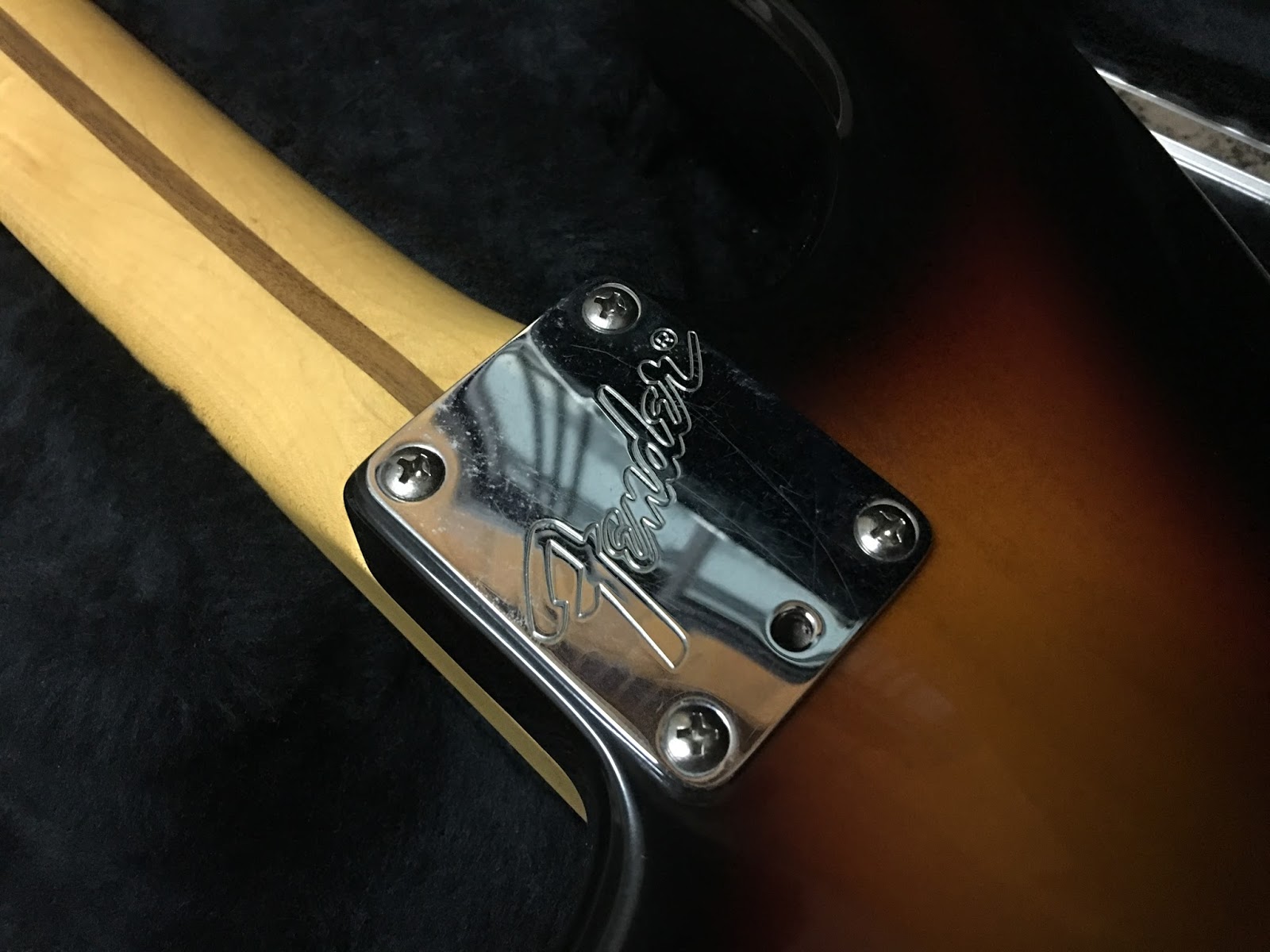
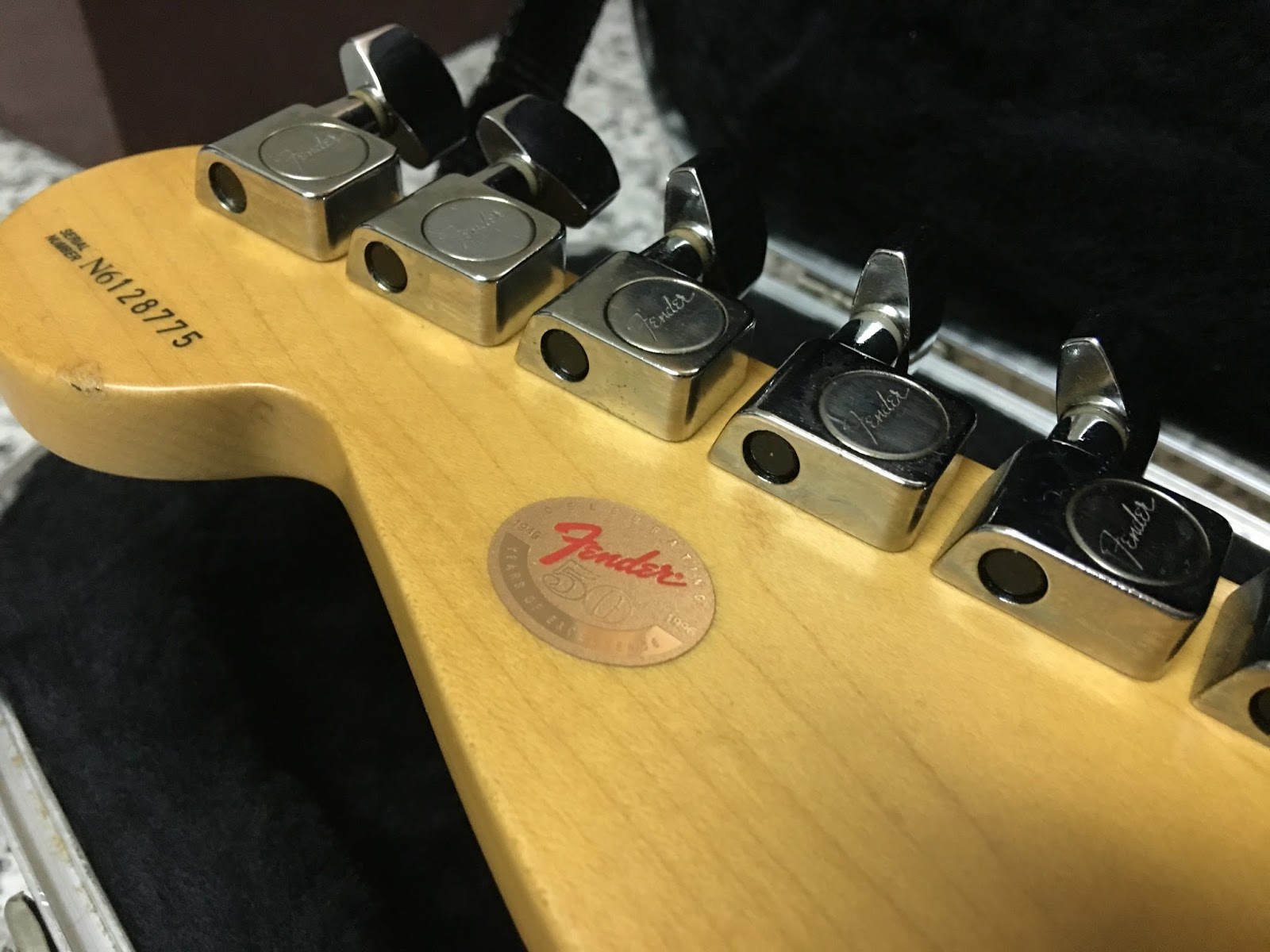
最後,分享一下成功帶回來的 96 年 Fender American Standard 


Cheers!


2016年7月14日 星期四

使用 Windows API 顯示記憶體用量

#include "windows.h"
#include "psapi.h"

QString CvtByteToFileSize(double Bytes)
{
 QString Unit;

 if (Bytes < 1024) {
  Unit = " bytes";
 } else if (Bytes < 1024*1024) {
  Bytes /= 1024;
  Unit = " kB";
 } else {
  Bytes /= 1024*1024;
  Unit = " MB";
 }

 return QString::number(Bytes) + Unit;
}

void PrintMemUsage()
{
 /* Virtual memory */
 MEMORYSTATUSEX memInfo;
 memInfo.dwLength = sizeof(MEMORYSTATUSEX);
 GlobalMemoryStatusEx(&memInfo);
 DWORDLONG totalVirtualMem = memInfo.ullTotalPageFile;
 DWORDLONG virtualMemUsed = memInfo.ullTotalPageFile - memInfo.ullAvailPageFile;

 LOG("Virtual Total: [%s] Used: [%s]",
  CvtByteToFileSize(totalVirtualMem).toStdString().c_str(),
  CvtByteToFileSize(virtualMemUsed).toStdString().c_str());

 LOG("=======================");
 PROCESS_MEMORY_COUNTERS pmc;

 if (GetProcessMemoryInfo(GetCurrentProcess(), &pmc, sizeof(pmc))){
  LOG("\tPageFaultCount: %s", CvtByteToFileSize(pmc.PageFaultCount).toStdString().c_str());
  LOG("\tPeakWorkingSetSize: %s", CvtByteToFileSize(pmc.PeakWorkingSetSize).toStdString().c_str());
  LOG("\tWorkingSetSize: %s", CvtByteToFileSize(pmc.WorkingSetSize).toStdString().c_str());
  LOG("\tQuotaPeakPagedPoolUsage: %s", CvtByteToFileSize(pmc.QuotaPeakPagedPoolUsage).toStdString().c_str());
  LOG("\tQuotaPagedPoolUsage: %s", CvtByteToFileSize(pmc.QuotaPagedPoolUsage).toStdString().c_str());
  LOG("\tQuotaPeakNonPagedPoolUsage: %s", CvtByteToFileSize(pmc.QuotaPeakNonPagedPoolUsage).toStdString().c_str());
  LOG("\tQuotaNonPagedPoolUsage: %s", CvtByteToFileSize(pmc.QuotaNonPagedPoolUsage).toStdString().c_str());
  LOG("\tPagefileUsage: %s", CvtByteToFileSize(pmc.PagefileUsage).toStdString().c_str());
  LOG("\tPeakPagefileUsage: %s", CvtByteToFileSize(pmc.PeakPagefileUsage).toStdString().c_str());
 }

 /* Physical memory */
 DWORDLONG totalPhysMem = memInfo.ullTotalPhys;
 DWORDLONG physMemUsed = memInfo.ullTotalPhys - memInfo.ullAvailPhys;
 SIZE_T physMemUsedByMe = pmc.WorkingSetSize;

 LOG("Physical Total: [%s] Used: [%s] UsedByMe: [%s]",
  CvtByteToFileSize(totalPhysMem).toStdString().c_str(),
  CvtByteToFileSize(physMemUsed).toStdString().c_str(),
  CvtByteToFileSize(physMemUsedByMe).toStdString().c_str());
}


Reference:

1. How to determine CPU and memory consumption from inside a process?http://stackoverflow.com/questions/63166/how-to-determine-cpu-and-memory-consumption-from-inside-a-process

2. PROCESS_MEMORY_COUNTERS structure

3. Collecting Memory Usage Information For a Process


2016年6月6日 星期一

Remove newline from std::string by "remove" function only is not working?

Test :

calling following:

remove(strRet.begin(), strRet.end(), '\n');

strRet is a std::string containing newline


It's not working!!!!!!!!!!!
if someone print it out....


Reson:

The function cannot alter the properties of the object containing the range of elements (i.e., it cannot alter the size of an array or a container)

Solution:

strRet.erase(remove(strRet.begin(), strRet.end(), '\n'), strRet.end());  

1. Calling remove and get a new end of std::string
2. Erase the removed part